Features
SCAIRE is an LLM chat assistant for the servers you already run. You bring your own LLM provider and keys, so no model ships bundled and your data never goes to a vendor you did not choose. It safely connects to your hosts and helps you troubleshoot, optimize, or just ask questions with the context of your setup.
It only runs what you allowed
An AI that can touch your hosts must prove it cannot wreck them. Every request meets one list of allowed commands before anything runs.
- One policy governs both the app and the OS. The same list of allowed commands drives the application checks and the server policy.
- Every command clears six separate gates inside the app before it runs. A seventh backstop sits in the Linux kernel and enforces the same policy below the application. All seven must agree, and what each gate checks stays unpublished.
- Deny is the default. A command you never classified refuses to run. Nothing runs because it was forgotten.
- Safe commands for hundreds of binaries across Debian, Proxmox, Docker, and core Linux tooling are pre-audited and ship with SCAIRE. Everything else is denied unless you explicitly pre-approve it as part of testing and development.
- Destructive requests get refused. Wipe and format style commands deny at two independent checks, and an approved request gets rechecked against the destructive list before it runs.
- Powerful actions ask first. Restarting a service, restarting an LXC container, or rebooting a VM: SCAIRE states what it wants to run and waits for your approval.
- A stop control always works. You can stop a running chat turn or schedule, and it ends at the next tool step.
Refused actions
Every destructive request in this session, in order. Each one stopped at the gate with a stated reason; none ran.
-
Attempt 1
pct destroy 101Destroying a container erases it. Refused as a destructive request.
-
Attempt 2
mkfs.ext4 /dev/sdbFormatting a disk wipes it. Refused as a destructive request before anything ran.
-
Attempt 3
zpool destroy tankDestroying a pool deletes its data. Refused as a destructive request.
-
Attempt 4
docker system prune -a --volumesRemoves every unused image and volume. Refused as a destructive request.
An excerpt of the capability list. The full list is yours to classify: real command names, your hosts, your verdicts.
| Command | What it may do | Verdict |
|---|---|---|
pct status 101 |
Read the status of one container | Allowed |
qm list |
List the virtual machines on a host | Allowed |
docker ps |
List the running containers | Allowed |
systemctl status pveproxy |
Read the state of one service | Allowed |
pct destroy 101 |
Erase a container and its disk | Refused |
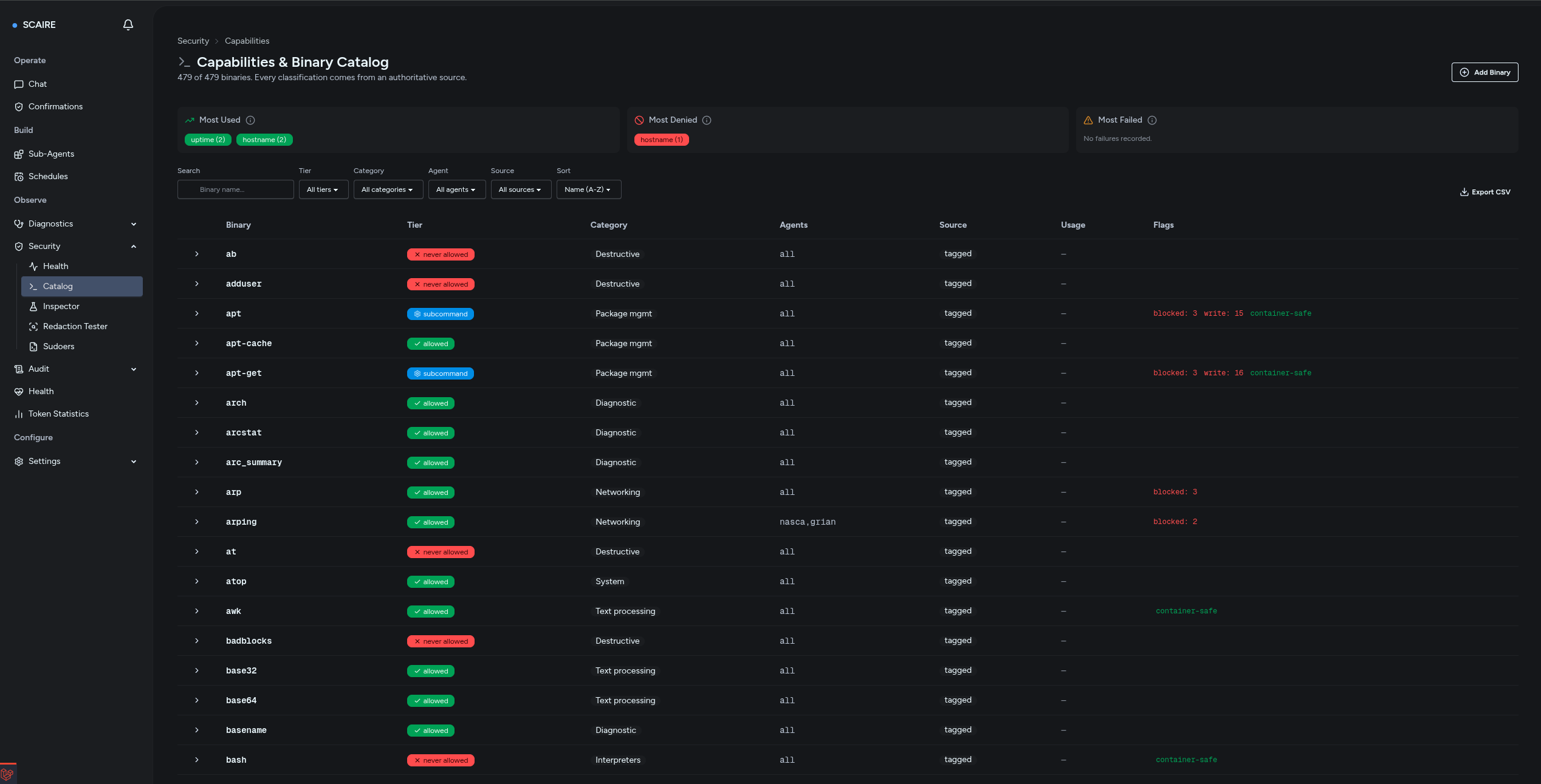
Screenshot 01/03
The capability catalog: every binary carries a verdict, from allowed to never allowed.
Open full size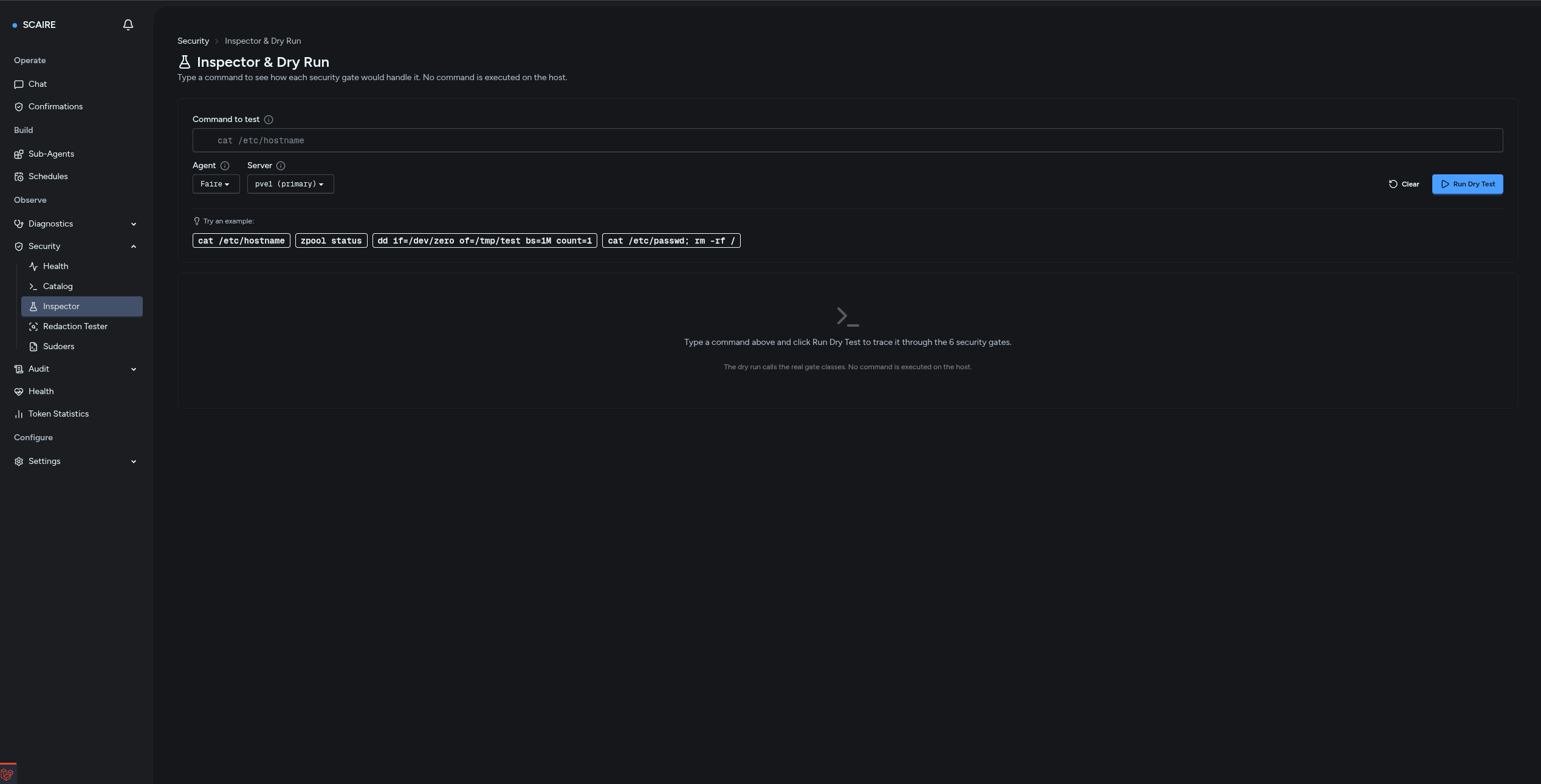
Screenshot 02/03
The dry-run inspector: test any command against the policy without touching a host.
Open full size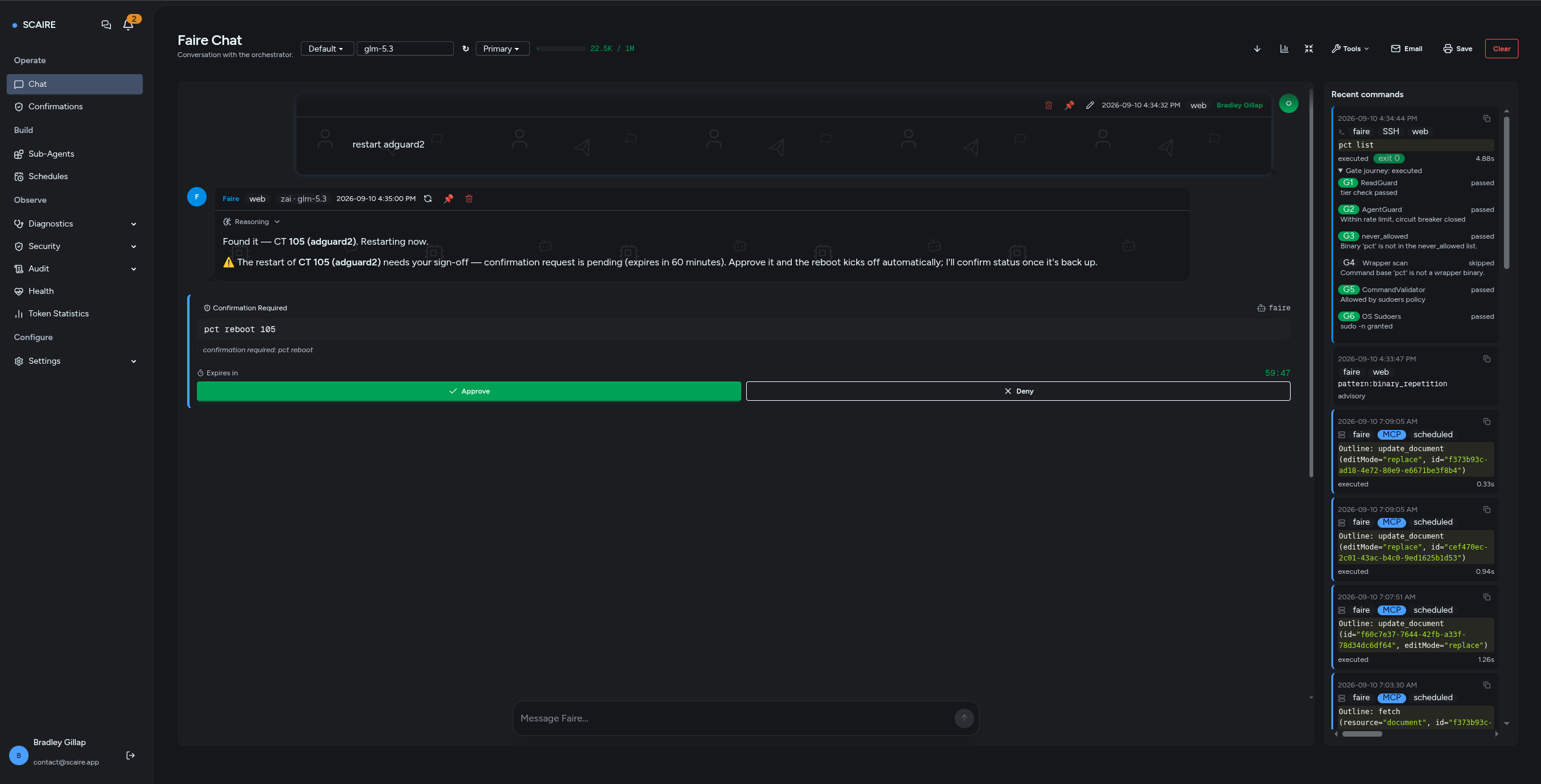
Screenshot 03/03
A reboot asks first: the approval card waits for your sign-off with a countdown.
Open full sizeSecrets are stripped before anything leaves your box
You will paste configs and command output into a conversation. None of it leaves with a secret still readable.
- Secrets are stripped from command output before the text reaches the model, the interface, or the stored record.
- Config dumps keep their shape. Sensitive values inside them get masked, so the model still reads the structure it needs.
- Outgoing requests get a second pass. Secrets that sit in older stored conversation history get masked on the wire too.
- Secrets at rest follow two rules. What the system must read back, such as a provider key, is stored encrypted. What the system only compares, such as a webhook secret, is stored as a one-way hash. A stolen data file alone reveals nothing.
Every value below is invented. The display format is real: it mirrors a product reply where structure stays readable and secret lines arrive as [REDACTED], key and value together.
Ran cat /etc/notifier/credentials.yml. Here is what came back:
/etc/notifier/credentials.yml
# Notifier API credentials
api_id: "notifier_9f2c41ab"
[REDACTED]
Credentials are in place. The id stays readable; the secret line arrived already [REDACTED], key and value together. It never reached the model.
![Chat reply where a YAML config dump stays readable except the secret lines, which display as [REDACTED], key and value together.](https://scaire.app/images/features/redacted-config-chat.png)
Screenshot 01/01
A config dump in chat: structure stays readable, secret lines arrive already stripped.
Open full sizeEvery action lands on the record
Autonomous work you cannot audit is a liability. In SCAIRE there is one command path in, and one audit trail out.
- Every entry point reaches the same command path. Web chat, Telegram, the CLI, schedules, and webhook alerts all funnel into it. There is no side door.
- Every command lands in one audit trail with its verdict. Ran, refused, or failed, each row shows the command, the agent, and the outcome.
- Cost math runs as plain code, never model output. The model never reports its own cost, so the number cannot flatter itself.
- Extensions ship off. Retrieval, visuals, real-time push, and the other subsystems stay disabled until you turn them on.
| Time | Agent | Command | Exit |
|---|---|---|---|
| 09:14:02 | Web chat |
pct status 101
Ran. Read-only status check.
|
exit 0 |
| 09:14:31 | Web chat |
docker ps --format json
Ran. Read-only listing.
|
exit 0 |
| 09:15:10 | Web chat |
zpool destroy tank
Refused. Destructive request denied at both checks.
|
refused |
| 09:20:00 | Schedule |
systemctl is-active pveproxy
Ran. Scheduled read-only check.
|
exit 0 |
| 09:20:04 | Schedule |
docker logs app-01
Failed. Exit status recorded with the run.
|
exit 1 |
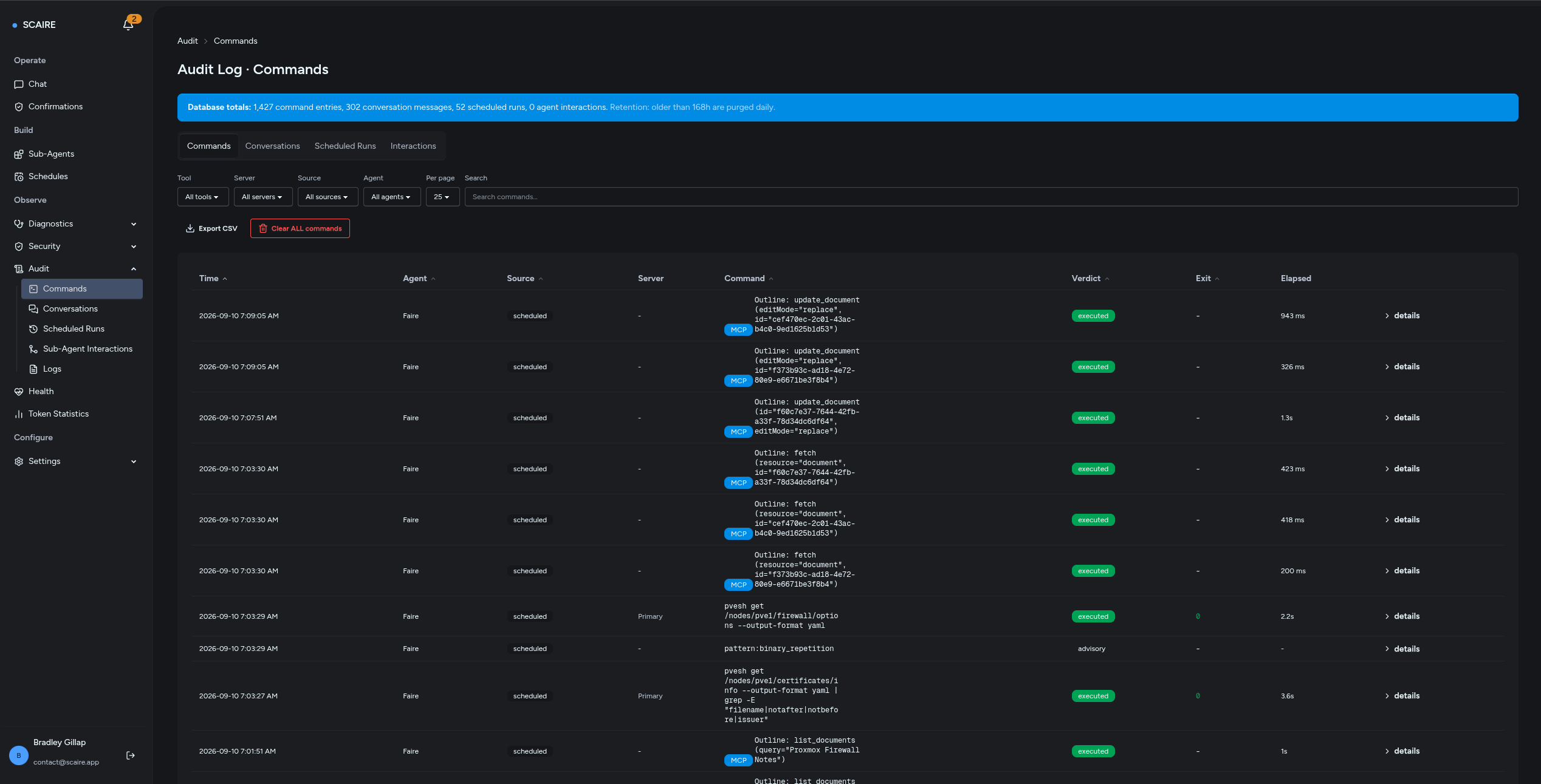
Screenshot 01/02
One audit trail: every command row carries its source, agent, and verdict.
Open full size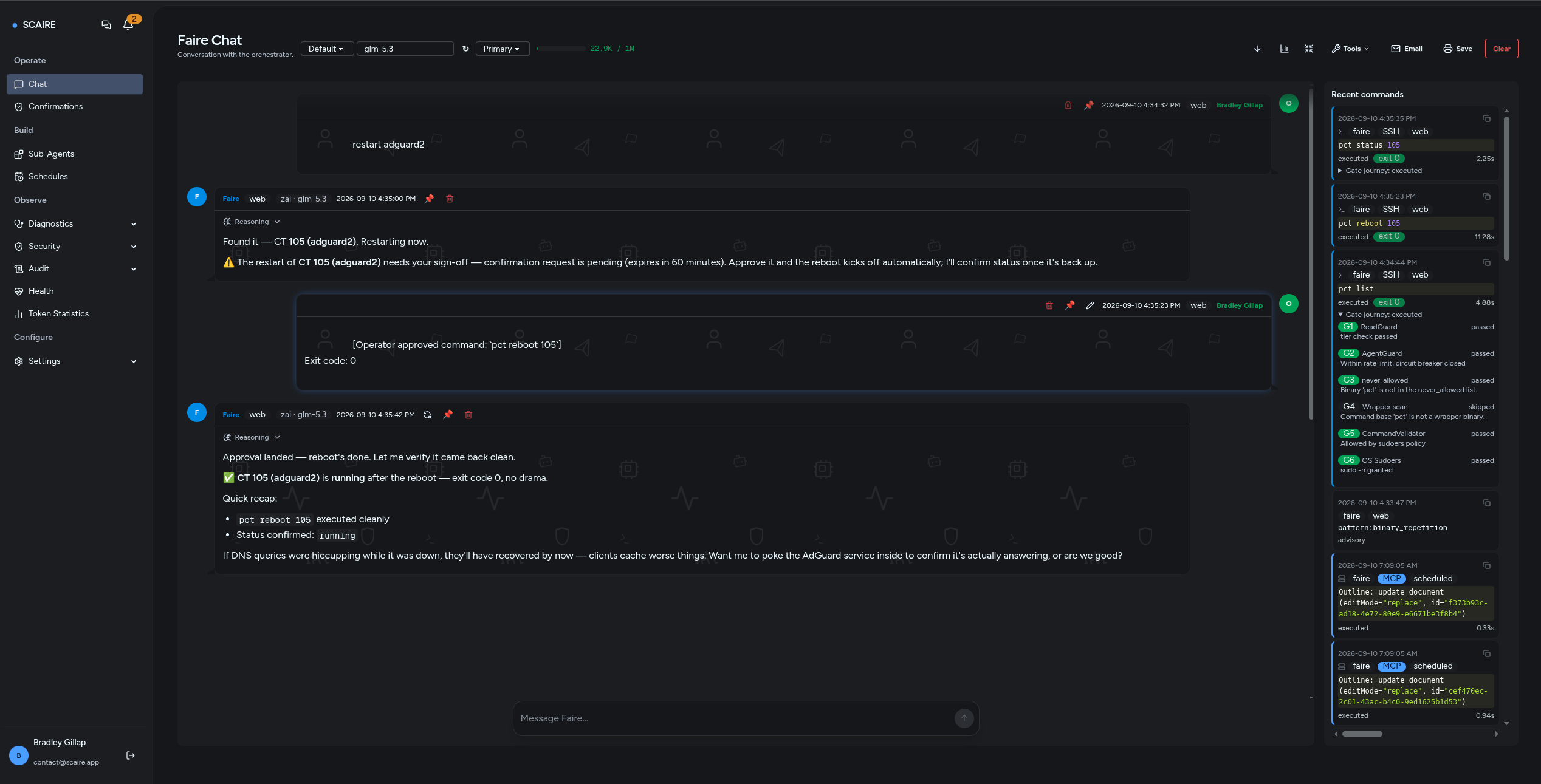
Screenshot 02/02
After approval: the command runs, lands on the record, and reports its outcome.
Open full sizeIt works the way you already do
A new tool that demands a new workflow becomes a new silo. SCAIRE meets you where you already work and runs where you already run.
- Reach it through web chat, Telegram, scheduled prompts, and webhook alerts from any monitor.
- It runs on your own iron. It works against the Proxmox and Debian hosts you already own. No cloud dependency, no data leaving your network.
- Extend it with MCP servers and API connectors when you want more tools, such as documentation lookup or web search.
- External tools stay under control. Allowlists and permission settings govern what each tool may do, and every call lands in the same audit trail.
Every extension starts off
-
Retrieval
Answer from your own documents and wikis.
Off by default
-
Visuals
Render charts and diagrams in replies.
Off by default
-
Real-time push
Stream live updates to your devices.
Off by default
-
External scanner
Feed in findings from a scanner you already run.
Off by default
-
Cross-run memory
Carry context from one session to the next.
Off by default
Each card ships off. You turn on only what you want, when you want it.